![513x513px Logo (1)-1.png]](https://support.unifiedpractice.com/hs-fs/hubfs/513x513px%20Logo%20(1)-1.png?height=40&name=513x513px%20Logo%20(1)-1.png)
The EHR Agenda app allows you to view, or schedule appointments for different practitioners.
- Tap on the three lines icon next to the bell icon in the top right hand corner.
- Click the drop down for Practitioners, choose the Practitioners you would like to view.
- Tap Apply in the top right hand corner to view.
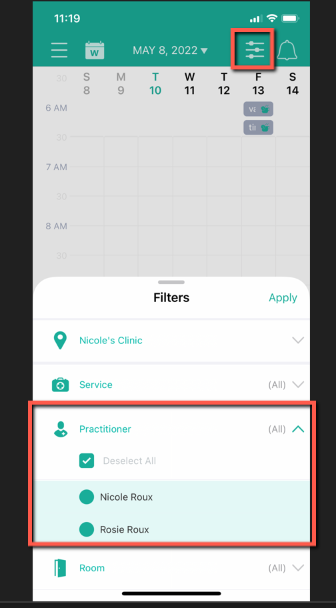
From there, you can view the practitioner's full schedule of appointments. You can also add an appointment from that practitioner if needed.
Note: In order to view all appointments for practitioners, the following permissions must be enabled for that practitioner in Clinic Settings > Clinic Staff:
- Clinic Calendar
- Clinic Patients
If you have any additional questions, please reach out to us at support@unifiedpractice.com