![513x513px Logo (1)-1.png]](https://support.unifiedpractice.com/hs-fs/hubfs/513x513px%20Logo%20(1)-1.png?height=40&name=513x513px%20Logo%20(1)-1.png)
What are the colored dots next to Patients' names on the Patient list?
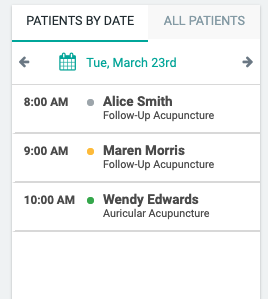
The colored dots beside a Patient's name in your Patient List indicate the status of the Patient's SOAP note for that appointment.
A red dot means the chart has been signed and is now locked.
A yellow dot means the chart is currently in progress and has not been signed.
A grey dot means the chart has not yet been started.